

| English | Korean | Chinese | Japanese |
Chapter 4. VMS Webserver
Setup: Cloud with Docker Image (Ubuntu 20.04)
By using the dockerized VMS WebAPI Server, you can stream live and playback videos from VMS to numerous users over the internet through cloud services such as Google Cloud, AWS, or Azure.
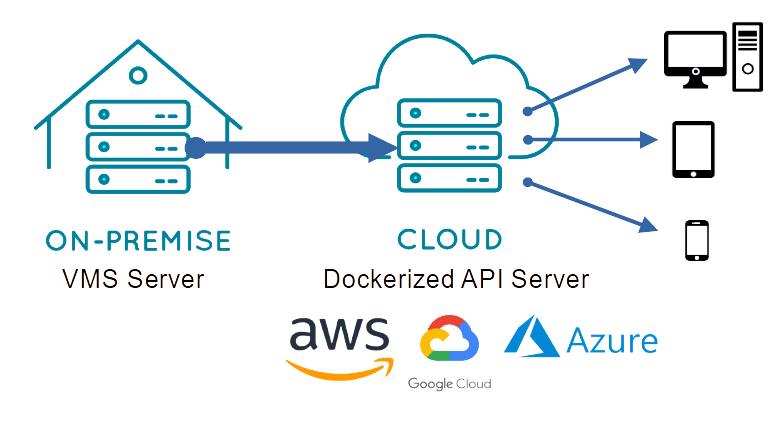
1. Download Docker Image: Download the Docker image from the website and unzip it.
2. Load Docker Image: Load the image into the Docker environment using the following command:
sudo docker load -i vms_webserver_x.x.tar
3. Start Docker Container: Start the container using the following command:
sudo docker run --restart=unless-stopped --name vms_webserver -d -p 8080:8080 \
  --mount type=tmpfs,destination=/mnt/ramdisk,tmpfs-mode=1770,tmpfs-size=100M \
  vms_webserver:x.x \
    --vms_url strasse.synology.me \
    --vms_id admin \
    --vms_pw admin \
    --http_cors http://your.domain.com:80 \
    --hls_live_channels 1,3,10-16{1} \
    --hls_ram_disk /mnt/ramdisk
· In the docker run command, `x.x` in `vms_webserver:x.x` represents the web server version.
· For the RAM disk, adjust the parameters according to the number of channels and the expected request load.
· You can set your web server URL in the `http_cors` option to allow access to the VMS Web API. If not set, access will be blocked by the browser due to the CORS policy.
· The web server arguments are as follows:
| Argument | Description | Value |
| --vms_url | URL of VMS server | Required |
| --vms_port | Port of VMS server | Optional / Default: 3300 |
| --vms_id | Access ID of VMS server | Required |
| --vms_pw | Access PW of VMS server | Required |
| --http_port | Port of HTTP server | Optional / Default: 8080 |
| --http_thread_count | Thread count of HTTP server | Optional / Default: 2 |
| --http_cors | Allowed origins (URLs) separated by commas | Optional / e.g., http://192.168.1.2, http://192.168.1.3:8080 |
| --http_disable_examples | Disable built-in examples | Optional / Default: Enabled |
| --hls_live_channels | Set the live channels for HLS streaming A sub-stream can be specified by appending its index in parentheses; otherwise, the primary stream is used. |
Required / e.g., 1,3,10-16{1} |
| --hls_ram_disk | Path to RAM drive for HLS temporary files | Optional / e.g., /mnt/ramdisk |
| --hls_list_size | Number of playlist entries | Optional / Default: 3 |
| --hls_time | Segment length in seconds | Optional / Default: 1 |
| --hls_time_playback | Segment length in seconds for Playback with duration | Optional / Default: 2 |